Organic Wood Background Bundle: A Guide to Choosing and Using High-Quality Textures
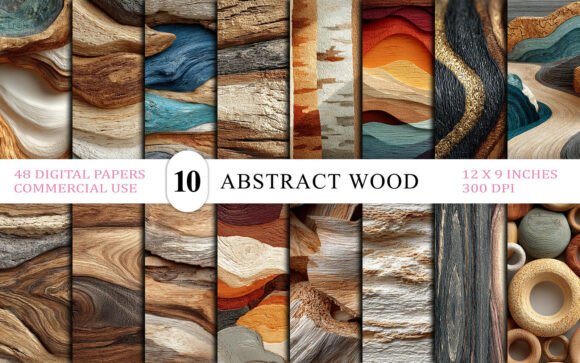
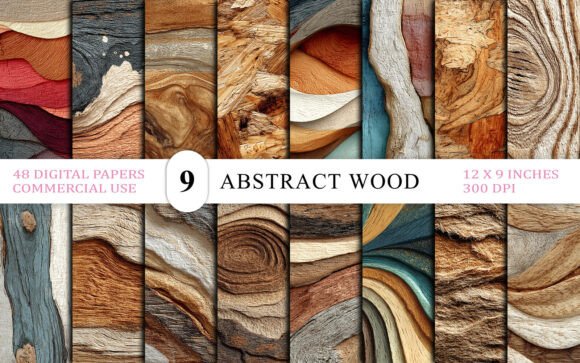
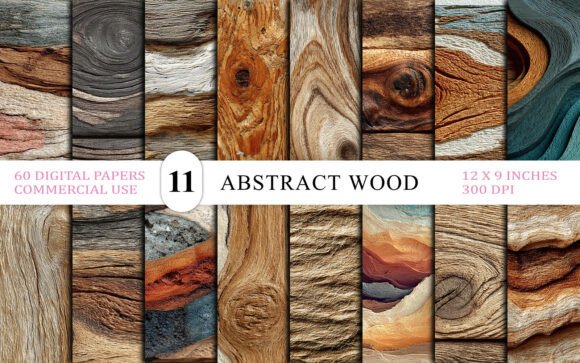
Integrating natural elements into digital design is more than a passing trend; it is a fundamental shift toward creating warmer, more inviting visual experiences. The Organic Wood Background Bundle offers a curated solution for designers who want to bypass the time-consuming process of sourcing individual assets. This collection brings the warmth, texture, and soul of real wood into your creative projects, featuring 60 high-resolution JPG backgrounds inspired by the raw beauty of wood. From natural bark grain to abstract carved textures, these assets are designed to elevate branding, web design, and print media.
However, simply downloading a pack of textures does not guarantee professional results. Many creators make critical errors in how they select, license, and apply these digital assets. Understanding the nuances of resolution, file formats, and aesthetic cohesion can mean the difference between a polished final product and a cluttered, amateurish design. This guide explores common pitfalls and provides practical advice on maximizing the value of the Abstract Wood Grain Texture Background Bundle.
Misunderstanding Resolution and Print Readiness
One of the most frequent mistakes beginners make is overlooking technical specifications until it is too late. You might find a texture that looks perfect on your screen, only to discover it becomes pixelated or blurry when printed or viewed on a high-density display. The Organic Wood Background Bundle addresses this by providing files at 3600x2700 pixels, which translates to 12x9 inches at 300 DPI. This is the industry standard for high-quality print work.
If you ignore these specs and use lower-resolution images from free stock sites, your final output may suffer from jagged edges and loss of detail. This is particularly damaging for physical products like packaging, business cards, or wall art. To avoid this, always verify the DPI (dots per inch) before starting your project. If you are designing for web use, you can scale down, but you cannot effectively scale up a low-resolution image without losing quality. By starting with a 300 DPI source file, you ensure flexibility across both digital and print mediums.
Overlooking Licensing and Commercial Use Rights
Another critical area where creators stumble is licensing. Not all digital papers are created equal regarding usage rights. Some free resources restrict use to personal projects only, meaning you cannot use them for client work, products for sale, or commercial marketing materials. Using such assets in a commercial context can lead to legal issues and costly takedown notices.
The 60 Abstract Wood Grain Texture Background Bundle is explicitly labeled as Premium Quality Commercial Use Ready. This distinction is vital for freelancers, small business owners, and entrepreneurs. Before integrating any texture into a client’s brand identity or a product you intend to sell, confirm that the license permits commercial application. This bundle allows you to use the textures in logos, website backgrounds, social media graphics, and physical products without fear of copyright infringement. Always read the license agreement, even when it seems straightforward, to protect your business and reputation.
Neglecting Visual Hierarchy and Contrast
Having access to 60 unique textures is a strength, but it can also lead to decision paralysis or poor design choices. A common error is using a busy wood grain texture as a background for complex text or intricate graphics. When the background competes with the foreground content, readability suffers, and the message gets lost. For example, placing dark text over a dark, grungy bark finish will render the text invisible.
To correct this, consider the contrast and complexity of the texture. The Abstract Wood Grain Texture collection includes a variety of styles, from subtle brown wood wallpaper tones to bold 3D wood art texture patterns. Use lighter, smoother textures for areas with heavy text, and reserve the more detailed engraved bark details or rustic depth backgrounds for hero sections, headers, or standalone visual elements. You can also adjust the opacity of the texture layer in your design software to create a softer, more subdued backdrop that supports rather than overwhelms your content.
Ignoring Color Harmony and Brand Consistency
Wood textures come in a wide range of hues, from cool gray driftwood to warm reddish mahogany. A frequent oversight is selecting a texture based solely on its pattern while ignoring its color temperature. If your brand palette features cool blues and whites, a warm, orange-toned log cut texture might clash, creating visual dissonance.
Before finalizing your choice, evaluate how the texture interacts with your existing color scheme. The nature-inspired texture options in this bundle offer diverse tonal ranges. You may need to adjust the hue, saturation, or brightness of the JPG file to align with your brand guidelines. Most design software allows you to recolor or tint these layers easily. Ensuring that the earthy material backdrop complements your primary colors creates a cohesive and professional look. This attention to detail signals quality and thoughtfulness to your audience.
Failing to Organize and Preview Assets
With 60 files in a single download, disorganization can slow down your workflow. Many users dump all files into a single folder and scroll through them randomly when inspiration strikes. This inefficient approach wastes time and leads to repetitive design choices.
A better practice is to preview and categorize the textures upon download. Create subfolders based on style, such as "Smooth," "Rough Bark," "Abstract Carved," or "Light Tones." This organization allows you to quickly locate the right woodworking digital asset for specific project needs. Additionally, keep a swipe file of successful combinations where you have used these textures effectively. Referencing past successes helps maintain consistency across different projects and speeds up the creative process.
Maximizing Versatility Beyond Backgrounds
Finally, many creators limit their use of these assets to simple backgrounds. While they excel in that role, the Organic Wood Background Bundle offers more versatility. These high-resolution JPGs can be used as clipping masks, overlay layers, or texture maps in 3D modeling software. For instance, you can use a wooden mosaic overlay to add depth to flat vector illustrations or apply a grungy bark finish to typography for a rugged, handcrafted feel.
Experiment with blending modes in your design software. Modes like Multiply, Overlay, or Soft Light can integrate the wood grain seamlessly with other elements, creating a unified composition. By thinking beyond the traditional background role, you unlock the full potential of the forest bark pattern and luxury wood pattern options included in the pack. This creative exploration can lead to unique visual signatures that set your work apart from competitors relying on generic stock imagery.
In conclusion, the Organic Wood Background Bundle is a powerful resource for enhancing digital and print projects. By paying attention to resolution, licensing, contrast, color harmony, and organization, you can avoid common pitfalls and produce high-quality, professional designs. Take the time to understand the tools at your disposal, and let the natural beauty of these textures elevate your creative vision.