Starfish Earrings Laser Cut: A Guide to Creating 3D Coastal Jewelry
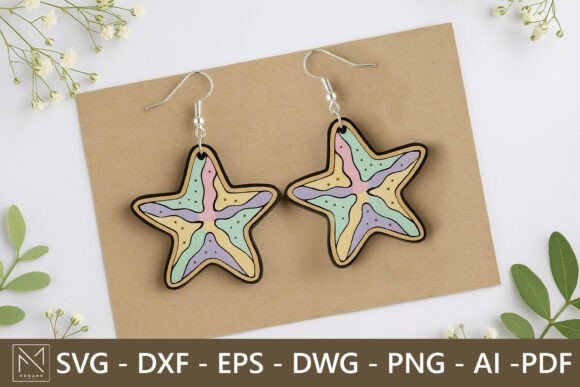
There is a distinct satisfaction in holding a piece of jewelry that you designed and crafted yourself, especially when it captures the essence of a season or a memory. Starfish Earrings Laser Cut designs have become a staple for modern crafters who want to blend digital precision with organic, beach-inspired aesthetics. These aren’t just flat cutouts; the magic lies in the layering. By stacking multiple pieces of wood, acrylic, or mixed materials, you create a stunning three-dimensional effect that catches the light and adds depth to a simple silhouette.
Whether you are running a small Etsy shop, preparing for a summer craft fair, or simply looking for a relaxing weekend project, understanding how to leverage these digital files can transform your creative output. The versatility of laser-cut jewelry allows for endless customization, making each pair unique to the wearer’s style.
Why Layered Designs Elevate Handmade Jewelry
The primary advantage of using a Starfish Earrings Laser Cut template is the built-in complexity it offers without requiring advanced artistic skills. When you work with layered designs, you move beyond the limitations of single-layer cutting. A flat starfish might look nice, but a starfish constructed from three different shades of bamboo, or a combination of translucent acrylic and matte wood, tells a visual story.
This technique mimics the texture found in nature. Real starfish have ridges, bumps, and varying tones. By cutting separate layers for the base, the mid-section, and the top details, you replicate this organic complexity. For crafters using machines like the Glowforge, Cricut Maker, or other desktop laser cutters, this approach maximizes the utility of the machine. It turns a quick cut into a sophisticated assembly project that feels high-end and thoughtful.
Ideal Materials for Coastal-Inspired Accessories
Choosing the right material is half the battle when creating durable and beautiful earrings. Since these designs are scalable and compatible with various formats like SVG, DXF, and AI, you have the freedom to experiment. Here are some practical observations on material choices:
- Bamboo Plywood: This is a favorite for eco-conscious creators. It cuts cleanly, has a beautiful natural grain, and is lightweight enough for comfortable all-day wear. The contrast between the light and dark layers of bamboo adds instant visual interest without needing paint.
- Acrylic: For a more modern, vibrant look, acrylic is unbeatable. You can use opaque colors for a bold pop or translucent sheets to create a sea-glass effect. When layered, acrylic can create depth similar to stained glass, especially if you back it with a metallic foil.
- Mixed Media: Don’t be afraid to combine materials. Imagine a wooden base for warmth and structure, topped with a thin layer of gold-mirrored acrylic for the starfish’s center. This hybrid approach appeals to buyers looking for something unique that stands out in a crowded market.
Remember that weight matters. While acrylic looks stunning, thick sheets can become heavy. Using thinner gauges for the top layers ensures the earrings remain comfortable while still providing that desired 3D presence.
From Hobbyist to Market Vendor: Real-World Applications
The utility of these digital files extends far beyond personal enjoyment. For many makers, Starfish Earrings Laser Cut templates are a gateway to small business revenue. Summer markets, beach town boutiques, and online platforms are always hungry for thematic, handmade accessories.
Consider the scenario of a crafter preparing for a July 4th or summer solstice fair. These earrings serve as perfect impulse buys. They are small, affordable, and evoke immediate feelings of vacation and relaxation. Because the files come in multiple formats including PDF and PNG, you can also use them for marketing materials. Create mockups for your social media posts using the PNGs before you even cut the physical product, allowing you to gauge interest and plan your inventory accordingly.
For wedding planners or bridal parties, these designs offer a niche solution. Bridesmaids often appreciate personalized gifts. By scaling the design down or adjusting the color palette to soft pastels or whites, you can create cohesive jewelry sets for a beach wedding. The ability to resize the vector lines means you can adapt the same core design for necklaces, keychains, or hair accessories, creating a full product line from a single purchase.
Navigating the Digital Download Process
It is crucial to understand that when you acquire these designs, you are purchasing a license to create, not a physical object. This distinction is vital for new laser cutter owners. You will receive a zip file containing SVG, DXF, EPS, DWG, PNG, AI, and PDF formats. This breadth of compatibility ensures that whether you are using LightBurn, Illustrator, CorelDRAW, or basic design software, you can import the file without conversion headaches.
Clean vector lines are a significant benefit here. Poorly optimized files can lead to jagged edges or unnecessary cut paths that waste time and material. High-quality templates ensure that your laser follows smooth paths, resulting in professional-grade edges that require minimal sanding or finishing. This efficiency is critical if you are producing items in batches for commercial purposes.
Customization and Creative Freedom
One of the strongest aspects of working with vector files is the ease of customization. You are not locked into the default size. If you find the standard earring size too large for delicate ears, you can scale it down by 10-15% in your software. Conversely, you might want to create a statement pendant necklace, in which case scaling up is seamless without loss of quality.
You can also modify the design elements. Perhaps you want to add a small initial to the center layer of the starfish, or change the shape of the dangle component. Having access to the AI and EPS files allows those with design skills to tweak the geometry. For those less confident in design software, the pre-layered structure provides a safe framework where you can simply change colors and materials while trusting the structural integrity of the original design.
Practical Considerations for Assembly
While the cutting process is automated, the assembly requires a human touch. Working with layered earrings means dealing with adhesives. Cyanoacrylate (super glue) is commonly used, but it can fog clear acrylic if not applied carefully. A toothpick or fine-tip applicator is essential for precise glue placement. Some crafters prefer UV resin for a stronger, clearer bond that also adds a glossy finish, though this adds curing time to your production workflow.
Hardware selection is another practical detail. Using hypoallergenic surgical steel or gold-filled hooks increases the perceived value of the product and reduces the risk of customer complaints regarding skin sensitivity. The connection point between the laser-cut starfish and the earring hook should be reinforced. Ensure that the hole cut for the jump ring is not too close to the edge of the material to prevent breakage during wear.
Respecting Intellectual Property
When using digital assets for commercial gain, it is important to adhere to licensing terms. Typically, you are free to sell the physical items you create using these Starfish Earrings Laser Cut files. However, redistribution or resale of the digital file itself is strictly prohibited. This protects the designer’s work and ensures that the marketplace remains fair for all creators. Always keep your download secure and do not share the source files with others, even if they are fellow crafters.
By focusing on quality assembly, thoughtful material selection, and creative presentation, you can turn a simple digital download into a standout product. Whether for personal style or commercial success, these layered designs offer a perfect blend of technology and artistry, capturing the timeless appeal of the ocean in a wearable format.