Unlocking Creativity: A Guide to the Butterfly Lamp Laser Cut Bundle and 3D Shadow Lantern Design
In the rapidly evolving world of digital fabrication, the intersection of technology and artistry has never been more accessible. For hobbyists, small business owners, and creative enthusiasts, laser cutting has emerged as a powerful tool for turning digital designs into tangible, functional art. Among the most captivating projects in this realm is the creation of ambient lighting fixtures, specifically the Butterfly Lamp Laser Cut Bundle. This article explores the significance of these CNC files, how they transform simple materials into mystical desktop lamps, and the technical nuances required to achieve professional results.
The Allure of 3D Shadow Lanterns
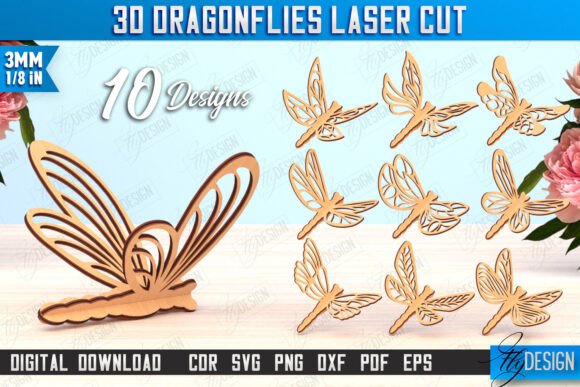
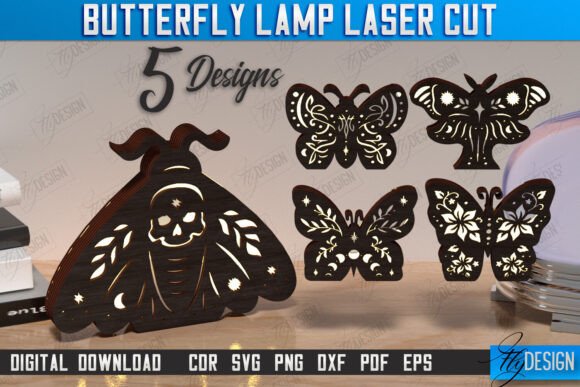
Lighting is no longer just about illumination; it is about atmosphere. The Butterfly Lamp Laser Cut Bundle 3D Shadow Lantern Desktop Lamp Mystical Design represents a shift towards personalized decor that tells a story. Unlike mass-produced plastic lights, these laser-cut lamps utilize layered materials to create depth, shadow, and visual interest. When lit from within, the intricate cutouts of butterflies and floral motifs cast dynamic shadows on surrounding walls, creating a "mystical" ambiance that changes with the time of day and the angle of view.
This type of project fits seamlessly into modern interior design trends that favor handmade, sustainable, and unique items. Whether used as a nightlight, a meditation aid, or a striking centerpiece on a desk, the butterfly lamp serves as a testament to the maker’s skill and creativity. It bridges the gap between traditional craftsmanship and modern digital precision.
Understanding the Digital Product: What Is Included?
For those new to laser cutting, understanding what you are purchasing is crucial. This product is a digital download, meaning no physical item is shipped. Instead, you receive a comprehensive zip archive containing the necessary vector and raster files to produce the lamp on your own machine. The bundle is designed for versatility and compatibility across various software platforms.
The archive includes:
- 5 SVG files: Scalable Vector Graphics, ideal for web-based cutters and many design programs.
- 5 EPS files: Encapsulated PostScript, a standard for professional graphic design software like Adobe Illustrator.
- 5 PNG files: Portable Network Graphics, useful for previewing designs or for users who need raster images for reference.
- 5 PDF files: Portable Document Format, great for viewing dimensions and printing templates if needed.
- DXF files: Drawing Exchange Format, widely recognized as the gold standard for CAD and laser cutting software.
This variety ensures that whether you are using a high-end industrial cutter or a desktop hobbyist machine, you have a file format that will work with your workflow. If you require a different file type or a specific color size for the PNG previews, the creator encourages you to send a message, highlighting a commitment to customer support and customization.
Technical Precision: CUT vs. ENGRAVE
One of the most critical aspects of successful laser cutting is understanding the difference between cutting and engraving. In this Butterfly Lamp Laser Cut Bundle, the files are meticulously prepared to guide your machine. The general rule provided with this product is straightforward yet vital:
- RED line - CUT: These lines indicate where the laser beam should pass completely through the material to separate the pieces.
- BLACK line - ENGRAVE: These areas indicate where the laser should etch the surface of the material without cutting through, adding texture and detail.
Following this color-coding system is essential for the structural integrity of the lamp. If you accidentally engrave a cut line, the pieces will remain connected, ruining the assembly. Conversely, if you cut an engrave line, you may lose delicate details that are meant to remain on the surface. Always double-check your software settings before starting the job.
Software Compatibility and the Lightburn Tip
While the bundle offers multiple file formats, not all formats behave equally in every software environment. A common point of confusion for beginners involves Lightburn, one of the most popular laser control software packages. Users often report that Lightburn can sometimes distort the dimensions of files, particularly when using SVG formats. This distortion can lead to parts that do not fit together correctly, resulting in frustration and wasted material.
To mitigate this issue, experts recommend using the DXF file format when working with Lightburn. DXF files are generally more robust in maintaining precise dimensional accuracy because they are native to CAD (Computer-Aided Design) environments. By importing the DXF files instead of SVGs, you ensure that the intricate joints and slots of the butterfly lamp align perfectly during assembly. This small technical adjustment can make the difference between a frustrating experience and a smooth, enjoyable build process.
Before beginning any project, always verify that your cutting machine and software are compatible with the provided files. Most modern CO2 lasers, diode lasers, and fiber lasers can handle these formats, but checking your machine’s manual is a prudent first step.
Why Choose CNC Files for Your Next Project?
Using pre-designed CNC files like this butterfly lamp bundle offers several advantages over designing from scratch:
- Time Efficiency: Designing complex 3D shadow lanterns requires advanced knowledge of vector graphics and spatial reasoning. Using a tested bundle saves hours of design time.
- Proven Accuracy: These files have likely been tested for fit and finish, reducing the trial-and-error phase often associated with custom designs.
- Creative Foundation: Even if you plan to modify the design, starting with a solid base allows you to focus on customization, such as changing the wood type, adding paint, or altering the light source.
Furthermore, these projects are excellent for educational purposes. They teach users about tolerance, material thickness, and the physics of light. For educators, introducing students to laser cutting through a visually rewarding project like a shadow lamp can spark interest in STEM fields and digital manufacturing.
Practical Tips for Assembly and Finish
Once the cutting and engraving are complete, the assembly process begins. Here are a few tips to ensure your Mystical Design CNC Files result in a polished final product:
- Material Selection: Use high-quality plywood or acrylic. For a warm, natural look, 3mm birch plywood is ideal. For a modern aesthetic, clear or frosted acrylic works beautifully.
- Cleaning: After cutting, gently sand any charred edges and wipe away smoke residue with a damp cloth. This ensures the glue adheres properly and the final look is clean.
- Lighting: Choose an LED strip or bulb with a warm color temperature (2700K-3000K) to enhance the mystical glow. Avoid hot incandescent bulbs, especially if using acrylic, to prevent melting.
Engaging with the Creator Community
The digital fabrication community thrives on sharing and feedback. The creator of this bundle invites users to follow their shop for future releases. By staying connected, you gain access to new designs, updates, and potentially exclusive bundles. If you have questions about file compatibility, scaling, or material recommendations, do not hesitate to write a message. Good creators value user feedback and are often willing to provide additional support or custom file adjustments.
In conclusion, the Butterfly Lamp Laser Cut Bundle is more than just a set of digital files; it is an invitation to create something beautiful and functional. By understanding the technical requirements, respecting the cut/engrave guidelines, and choosing the right file format for your software, you can produce a stunning 3D shadow lantern that enhances any space. Whether you are a seasoned maker or a curious beginner, this project offers a rewarding blend of technology and artistry.
Thank you for visiting my shop. Follow me, so you can see my future releases in your feed 🙂.