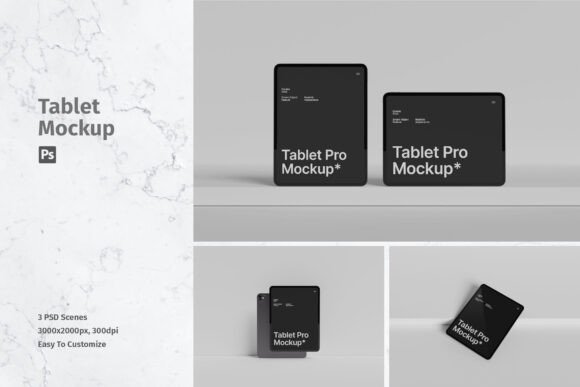
Elevating Design Presentations with the iPad Pro Mockup
In the digital design landscape, the gap between a concept and a client’s approval is often bridged by presentation. A flat JPEG of an interface or a graphic layout rarely conveys the full potential of a project. This is where the iPad Pro Mockup becomes an indispensable tool for modern creatives. It transforms static designs into immersive, realistic visualizations that resonate with stakeholders and audiences alike. By leveraging high-quality 3D rendering and smart technology, designers can showcase their work in a context that feels tangible and professional.
The Power of Realistic Context
When you present a design, you are not just showing colors and typography; you are selling an experience. An iPad Pro Mockup allows you to place your artwork onto a device that millions of users recognize and trust. The sleek lines, the thin bezels, and the premium finish of the iPad Pro serve as a perfect canvas for UI/UX designs, digital illustrations, and marketing materials.
Using a mockup eliminates the ambiguity of imagination. Instead of asking a client to visualize how an app might look on a tablet, you show them. This item is suitable to showcase your designs professionally in a realistic 3D display, providing a level of fidelity that flat images simply cannot achieve. The psychological impact of seeing a design "in situ" helps build confidence and accelerates decision-making processes.
Technical Excellence and Ease of Use
One of the primary concerns for designers adopting new tools is the learning curve. Fortunately, this resource is built with efficiency in mind. Available in PSD Photoshop format with smart-object features, it helps you replace the current designs with your own within seconds. You do not need advanced 3D modeling skills or hours of rendering time.
The process is straightforward:
- Open the provided PSD file.
- Double-click the Smart Object layer.
- Paste your design into the new window.
- Save and close.
Key Features and Specifications
Understanding the technical backbone of a mockup helps in determining its suitability for various projects. This specific iPad Pro Mockup package is engineered for high-end output and flexibility. Here is a breakdown of what makes it a robust choice for professionals:
- High Resolution: With dimensions of 4500x3000 px, the files are large enough for detailed close-ups and high-quality prints.
- Print-Ready Quality: At 300 dpi, these mockups are suitable for both digital portfolios and physical print collateral, such as brochures or case study books.
- Variety: The package includes 3 PSD files, offering different angles or lighting setups to keep your portfolio diverse.
- User-Friendly: Easy to use with Smart-Objects, ensuring a non-destructive workflow.
- Support: A help file is included to guide you through any initial setup questions.
It is important to note that photos used in the preview are not included; it is just for illustration purpose only. This is a standard industry practice, ensuring that the focus remains on the mockup structure rather than proprietary stock imagery.
Who Benefits from Using iPad Pro Mockups?
The utility of this tool extends beyond just graphic designers. Various professionals can leverage the iPad Pro Mockup to enhance their communication and branding efforts.
- UI/UX Designers: For app developers and interface designers, displaying screens on a realistic device frame provides necessary context regarding scale and usability. It helps in demonstrating how buttons, text, and images interact within the physical constraints of the hardware.
- Digital Marketers: When creating social media ads or email campaigns, featuring a product on a recognizable device increases click-through rates. It signals to the viewer that the content is optimized for mobile and tablet consumption.
- Freelancers and Agencies: Winning clients often depends on the perceived value of your work. High-quality mockups elevate the perceived quality of the deliverable, allowing freelancers to command higher rates and agencies to maintain a premium brand image.
- Educators and Students: In academic settings, presenting projects on realistic devices helps students understand the importance of presentation and prepares them for industry standards.
Real-World Applications and Scenarios
To truly appreciate the value of an iPad Pro Mockup, consider these practical scenarios where it makes a significant difference:
1. The Portfolio Case Study
Imagine you have redesigned a popular news application. A screenshot alone looks flat. However, placing that design onto an iPad Pro mockup, perhaps angled slightly to catch the light, creates a narrative. It suggests usage, lifestyle, and modernity. When potential employers browse your portfolio, this visual appeal keeps them engaged longer.
2. Client Proposals
You are pitching a new branding package to a corporate client. Part of the deliverable includes a digital magazine layout. By inserting your layout into the mockup, you allow the client to envision the final product in the hands of their customers. This reduces abstract thinking and focuses the conversation on concrete details like color accuracy and readability.
3. Social Media Content
For creators sharing behind-the-scenes content or finished works on platforms like Instagram or LinkedIn, aesthetic consistency is key. Using the same high-quality mockup style across posts creates a cohesive brand identity. The 4500x3000 px size ensures that even when cropped for different aspect ratios, the image remains crisp and clear.
Evaluating Suitability for Your Needs
While the iPad Pro Mockup is a powerful asset, it is essential to evaluate whether it fits your specific workflow. Consider the following factors:
Project Scale: If you are working on quick sketches or wireframes, a high-fidelity 3D mockup might be overkill. However, for final presentations and marketing materials, it is ideal.
Software Compatibility: Ensure you have access to Adobe Photoshop. Since this item relies on Smart Objects, it is not compatible with basic image editors or vector-only software like Illustrator without rasterization.
Lighting and Environment: The mockup comes with pre-set lighting. If your design requires a very specific environmental reflection (e.g., a dark mode app in a night setting), you may need to adjust the blending modes or opacity layers within Photoshop to match the mood perfectly.
Maximizing the Value of Your Mockup
To get the most out of this tool, do not just drop in your design and export. Take a moment to refine the presentation. Check the alignment of your screen content within the Smart Object. Ensure that critical UI elements are not obscured by glare or perspective distortion.
Furthermore, consider the background. While the mockup provides the device, the environment around it sets the tone. A clean, white background suggests minimalism and tech-focus, while a textured wooden desk implies warmth and creativity. Experiment with different backgrounds to see which best complements your specific design aesthetic.
Conclusion
In a competitive digital world, presentation is paramount. The iPad Pro Mockup offers a bridge between creative intent and client perception. By providing a realistic, high-resolution, and easy-to-use platform for showcasing work, it empowers designers to communicate their vision with clarity and impact. Whether you are a seasoned agency veteran or a budding freelancer, integrating this tool into your workflow can significantly enhance the professionalism of your output. Remember, the goal is not just to show what you designed, but to show how it lives in the real world. With the right mockup, your designs don’t just sit on a screen; they come to life.