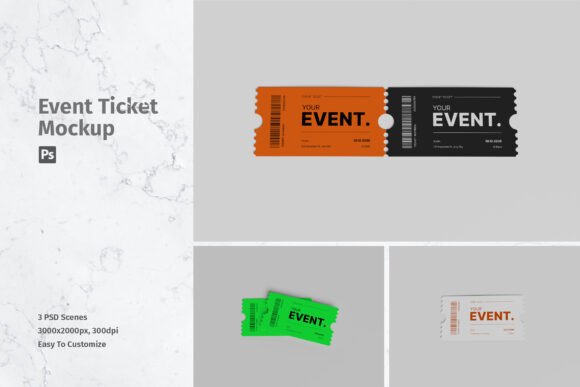
Presenting Your Event Designs with a Professional Ticket Mockup
There is a distinct moment in the creative process when a flat design stops being just pixels on a screen and starts looking like a tangible object. For event organizers, graphic designers, and marketers, that transition is crucial. You might have spent hours perfecting the typography, color grading, and layout of your concert pass or festival entry ticket, but showing it as a two-dimensional JPEG rarely captures the excitement it deserves. This is where a high-quality Ticket Mockup becomes an essential tool in your workflow. It bridges the gap between concept and reality, allowing you to present your work in a way that feels authentic, valuable, and ready for production.
Using a realistic 3D display isn’t just about aesthetics; it is about communication. When you share a design with a client, a sponsor, or your social media audience, you are asking them to imagine holding that ticket in their hands. A well-crafted mockup does the heavy lifting for them. It provides context, lighting, and texture that make the design feel immediate and real. Whether you are promoting a local theater production, a corporate conference, or an exclusive VIP experience, the presentation of your visual assets can significantly impact how your brand is perceived.
Why Realism Matters in Digital Presentations
In today’s digital-first world, most people will never physically touch your ticket before they buy it. They make decisions based on what they see on their smartphones or laptops. If your promotional material looks flat or amateurish, potential attendees might subconsciously question the quality of the event itself. A professional Ticket Mockup adds a layer of polish that signals competence and attention to detail.
The psychological effect of seeing a design in a realistic setting is powerful. It helps viewers visualize themselves at the event. When they see the subtle shadows, the paper texture, and the perspective of a ticket resting on a table or held in a hand, it triggers a sense of ownership and anticipation. This is particularly important for fundraising events or limited-edition releases where perceived value drives sales. By using a mockup that mimics real-world lighting and materials, you elevate the perceived worth of the ticket, making it feel like a keepsake rather than just an entry permit.
Versatile Use Cases for Creators and Businesses
The utility of a ticket mockup extends far beyond simple graphic design portfolios. Different professionals can leverage this tool in various scenarios to achieve specific goals.
- Event Marketers: When launching a new festival or conference, social media teasers are critical. A static image of a logo is forgettable, but a 3D render of the ticket with vibrant colors and realistic depth stops the scroll. It creates buzz and gives followers something concrete to share.
- Freelance Designers: If you are pitching to a new client, your portfolio needs to stand out. Including mockups in your case studies shows that you understand the final application of your work. It demonstrates that you think about how the design lives in the real world, not just how it looks in Adobe Illustrator.
- Small Business Owners: For boutique cinemas, escape rooms, or guided tour operators, tickets are part of the customer experience. Using mockups allows you to test different design variations quickly before sending files to the printer, saving money on costly proofing errors.
- Educators and Students: In design courses, students often need to present final projects. A mockup provides a professional finish to academic work, helping students bridge the gap between classroom assignments and industry standards.
Streamlining Your Workflow with Smart Objects
One of the biggest hurdles in creating realistic presentations is the technical time investment. Traditionally, adding a design to a 3D perspective required complex warping, masking, and lighting adjustments. Modern tools have simplified this dramatically. The item described here is suitable to showcase your designs professionally because it leverages smart-object features in Photoshop. This functionality is a game-changer for efficiency.
With smart objects, you don’t need to be a Photoshop wizard to get professional results. You simply double-click the smart object layer, paste your flat design into the new window, save, and close. The mockup automatically updates, applying your design to the 3D shape with correct perspective, distortion, and lighting interactions. This means you can replace the current designs with your own within seconds. For a marketer who needs to create ten different variations for A/B testing on Facebook ads, this speed is invaluable. It allows for rapid iteration without sacrificing quality.
The availability of multiple PSD files further enhances this flexibility. Having three different PSD options means you can choose the angle or composition that best suits your specific design. Maybe one angle highlights the QR code area, while another showcases the artistic illustration on the back. This variety ensures that your presentation remains fresh and tailored to the unique aspects of each event.
Technical Quality and What to Consider Before Downloading
When selecting a resource like this, technical specifications matter. The file size of 4500x3000 pixels at 300 dpi ensures that your output is crisp and print-ready if needed. While most uses will be digital, having high-resolution source files means you can crop and zoom without losing clarity. This is particularly useful for detailed designs with fine print or intricate patterns.
However, users should keep a few practical considerations in mind. First, remember that photos used in the preview are not included; they are for illustration purposes only. This is standard for mockup templates, but it means you need to plan your background and styling if you want to customize the environment beyond the ticket itself. Second, ensure you have access to Adobe Photoshop, as this format relies on its specific smart-object capabilities. If you are using alternative software, you may need to convert the file or look for PNG-based alternatives, though these often lack the same level of editable realism.
Another consideration is the help file included with the package. Even if you are experienced with design software, taking a minute to read the documentation can reveal tips on adjusting lighting or shadow intensity to better match your brand’s aesthetic. These small tweaks can make the difference between a good mockup and a great one.
Enhancing Brand Credibility Through Presentation
Ultimately, the goal of using a Ticket Mockup is to build trust. In a crowded marketplace, professionalism is a key differentiator. When your promotional materials look polished and realistic, it reassures customers that the event will be well-organized and worth their time and money. It shows that you care about every touchpoint of the customer journey, from the first ad they see to the moment they walk through the door.
By integrating these tools into your regular design routine, you save time, reduce stress, and elevate the quality of your output. Whether you are a solo entrepreneur managing a small workshop or part of a large team launching a global tour, the ability to quickly generate high-fidelity visuals is a competitive advantage. It allows you to focus more on the creativity of the event itself and less on the technicalities of presentation. Embrace the efficiency of smart objects and the impact of 3D realism to make your next event launch unforgettable.