Presenting Your Work with a Realistic Magazine Mockup
There is a distinct gap between a flat digital file and a tangible, professional presentation. As designers and creative professionals, we often spend hours perfecting the layout, color grading, and typography of a project, only to present it as a static JPEG on a white background. This is where a high-quality Magazine Mockup becomes an indispensable tool in your workflow. It bridges the divide between concept and reality, allowing clients and stakeholders to visualize how their brand or editorial content will look in the physical world. By utilizing a realistic 3D display, you transform a simple design into a compelling narrative that speaks to quality and attention to detail.
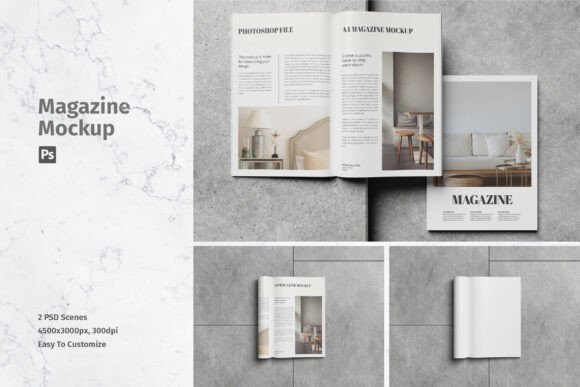
The appeal of this specific item lies in its versatility and ease of use. It is not merely a placeholder; it is a sophisticated presentation asset designed to showcase your designs professionally. Whether you are an independent publisher launching a new zine, a marketing agency pitching a campaign, or a freelancer building your portfolio, the ability to replace designs quickly using smart-object features saves valuable time. Available in PSD Photoshop format, this resource ensures that you can swap out current designs with your own within seconds, maintaining the integrity of lighting, shadows, and perspective without manual editing.
Elevating Brand Perception Through Realistic Context
Visual context matters. When a client sees their logo or article spread on a glossy page with natural folds and ambient lighting, the perceived value of the work increases significantly. This psychological effect is crucial in brand identity development. A flat image can feel sterile, but a mockup adds texture and life. It suggests that the project is ready for print, fostering confidence in the final product. For entrepreneurs and small business owners, this level of professionalism can be the deciding factor in securing a contract or making a sale.
Consider the impact on editorial design. Magazines are tactile experiences. The way light hits the paper, the slight curvature of the spine, and the depth of the pages all contribute to the reader's engagement. By using a premium font or a striking visual layout within a realistic magazine setting, you highlight the strengths of your typography and composition. If you have selected a bold display font for a headline, seeing it rendered in a 3D environment helps verify its legibility and impact. Similarly, a delicate script font used in a fashion spread gains elegance when placed against the textured backdrop of a printed page.
This approach also extends to packaging design and promotional materials. Often, a magazine feature is part of a larger marketing ecosystem. Showing how a product advertisement looks within the context of a publication helps marketers understand the integration of their social media graphics and print ads. It creates a cohesive story across different mediums, reinforcing brand consistency. When you present a complete picture, you demonstrate strategic thinking, which is highly valued in commercial projects.
Technical Precision and Workflow Efficiency
One of the most frustrating aspects of using low-quality templates is the time spent fighting with layers and alignment. This Magazine Mockup addresses those pain points directly by offering a streamlined technical experience. The inclusion of smart objects is the key feature here. Smart objects in Photoshop allow you to double-click a layer, paste your design, save, and instantly see it applied to the mockup with all distortions and lighting effects automatically adjusted. This non-destructive editing process ensures that your original design files remain untouched and editable.
The specifications of this asset further support professional standards. With two PSD files included, each at a resolution of 4500x3000 pixels and 300 DPI, the output is crisp and suitable for high-resolution displays or even large-format printing if needed. This high fidelity is essential when showcasing intricate details, such as fine lines in a serif font or subtle gradients in a photograph. Low-resolution mockups often pixelate or blur these details, undermining the quality of your work. By starting with a high-DPI base, you ensure that every element of your modern typography and imagery remains sharp.
Furthermore, the availability of a help file ensures that even those less familiar with advanced Photoshop techniques can achieve professional results. This accessibility makes the tool valuable for a wide audience, from seasoned graphic designers to hobbyists and bloggers who want to elevate their content. The ease of use means you can iterate quickly. If a client requests a change in the cover image or a tweak to the interior layout, you can implement it in seconds rather than minutes or hours. This efficiency allows you to focus more on creative decisions and less on technical troubleshooting.
Strategic Application Across Creative Projects
While the primary function is obvious, the applications of a magazine mockup extend far beyond traditional publishing. For web designers, it serves as an excellent way to present case studies. Instead of showing a flat screenshot of a website, you can feature the site’s launch article or a behind-the-scenes interview in a magazine format. This adds a layer of sophistication to your portfolio and demonstrates your ability to think across mediums. It shows that you understand how digital content can translate into print and vice versa.
For content creators and influencers, this tool is perfect for creating promotional assets for social media. A well-designed mockup can serve as the hero image for an Instagram post or a Pinterest pin, driving higher engagement due to its aesthetic appeal. It allows you to showcase e-books, guides, or digital products in a tangible way, making them feel more substantial and valuable to potential buyers. When you pair a clean sans serif font with a minimalist magazine layout, you convey modernity and clarity, which resonates well with tech-savvy audiences.
When selecting fonts and design elements to place within the mockup, consider the overall mood you wish to convey. A vintage-style magazine might benefit from a classic serif font or a decorative handwritten font, evoking nostalgia and warmth. In contrast, a contemporary tech publication would align better with a geometric sans serif font and bold, high-contrast imagery. Testing these font pairings within the mockup environment helps you gauge their effectiveness before finalizing the design. It acts as a sandbox where you can experiment with hierarchy and balance without committing to final print runs.
It is important to note that photos used in the preview are for illustration purposes only and are not included in the download. This is standard practice for design assets, ensuring that you retain full control over the intellectual property of the content you present. It encourages you to use your own photography or licensed stock images, ensuring that the final presentation is unique to your brand. This distinction reinforces the importance of original content in building a strong brand identity.
Ultimately, investing in high-quality design assets like this magazine mockup is an investment in your professional reputation. It signals to clients that you care about the presentation of your work as much as the work itself. By providing a realistic, polished view of your projects, you facilitate better communication, faster approvals, and stronger emotional connections with your audience. Whether you are working on a logo design campaign, an editorial spread, or a personal passion project, the right mockup can transform good design into great storytelling.