Elevate Your Design Portfolio: The Power of Social Media Mockups in Professional Presentation
In the fast-paced digital landscape, creating a stunning graphic is only half the battle. The other half is presenting that design in a way that captures attention, communicates value, and looks undeniably professional. This is where the concept of a Social Media Mockup becomes an indispensable tool for designers, marketers, and business owners alike. Whether you are showcasing a new Instagram campaign, a Facebook ad, or a LinkedIn banner, the context in which your design is viewed matters just as much as the design itself.
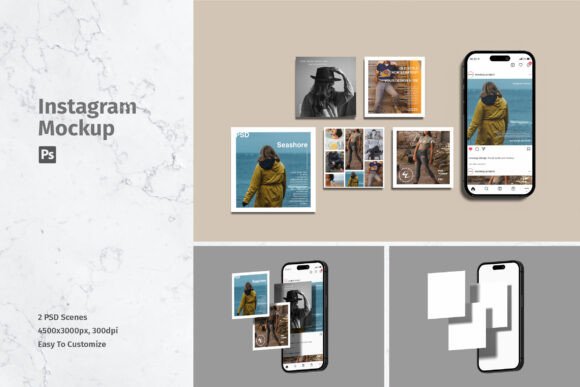
A high-quality mockup does more than just display an image; it places your work into a realistic, relatable environment. By utilizing a realistic 3D display, you allow clients and viewers to visualize how your creative assets will appear on actual devices. This bridge between digital creation and physical perception is crucial for building trust and demonstrating expertise. In this article, we will explore why these tools are essential, how they function technically, and how you can leverage them to streamline your workflow.
Why Context Matters in Digital Design
When you send a flat JPEG file to a client, you are asking them to use their imagination. You are hoping they can envision how that square image will look on a smartphone screen held in a hand, or how a banner will sit within the interface of a social media platform. However, human psychology responds better to concrete visuals. A social media mockup removes the guesswork.
Consider the difference between seeing a logo on a white background versus seeing that same logo displayed on a sleek, modern smartphone screen resting on a wooden desk. The latter tells a story. It suggests lifestyle, usability, and professionalism. For businesses, this translates to higher perceived value. For designers, it means fewer rounds of revisions because the client can immediately grasp the final outcome.
This approach fits seamlessly into modern workflows where speed and quality are paramount. In education, students learn to present their portfolios with greater impact. In business, marketing teams can pitch campaigns with greater confidence. The mockup serves as a universal language that clarifies intent and enhances appreciation for the creative effort involved.
Understanding the Technical Advantage: Smart Objects
One of the most significant barriers to using mockups in the past was the technical difficulty. Designers often had to manually warp images, adjust lighting, and match perspectives—a time-consuming process that required advanced skills. Today, however, the industry standard has shifted toward user-friendly solutions, specifically those built with Smart Object features in Adobe Photoshop.
So, what exactly is a Smart Object? In simple terms, it is a container that holds your design data non-destructively. When you open a PSD file equipped with smart objects, you do not need to worry about distorting your image or matching shadows manually. The process is remarkably straightforward:
- Open the File: Load the PSD template into Photoshop.
- Locate the Smart Layer: Find the layer marked as a Smart Object (usually indicated by a small icon in the corner of the layer thumbnail).
- Double-Click: This opens a separate tab containing your placeholder design.
- Replace and Save: Paste your own design into this tab, save it, and close it. Your main document updates automatically.
This feature allows you to replace current designs with your own within seconds. It democratizes high-end presentation, making it accessible to beginners while saving experienced professionals hours of tedious editing. The efficiency gained here cannot be overstated; it allows creatives to focus more on design strategy and less on technical assembly.
Key Features of a Premium Mockup Package
Not all mockups are created equal. To ensure you are getting a tool that truly enhances your workflow, look for specific technical specifications. A premium social media mockup package should offer more than just a pretty picture. It needs to be robust, versatile, and easy to integrate into your existing projects.
Here are the critical features to look for when selecting a mockup resource:
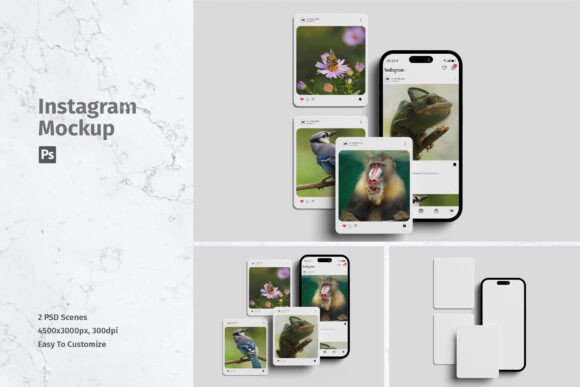
- High Resolution: Look for files with a size of at least 4500x3000 px. This ensures that your presentation remains crisp even on high-density retina displays or when printed in large formats for case studies.
- Print-Ready Quality: A resolution of 300 DPI (dots per inch) is the gold standard for professional printing. While most social media content is viewed digitally, having high-DPI assets ensures your portfolio pieces look flawless in any medium.
- Multiple Variations: A good package often includes multiple files. For instance, having 02 PSD files allows you to showcase different angles or lighting conditions, providing variety to your presentation without needing to create new scenes from scratch.
- Comprehensive Documentation: An included Help file is invaluable, especially for those new to Photoshop. It guides you through the smart object process, troubleshooting common issues and ensuring you get the best results quickly.
Practical Applications Across Industries
The utility of social media mockups extends far beyond individual freelance designers. They are vital tools in various sectors where visual communication is key.
For Marketing Agencies: When pitching a new campaign to a potential client, static images often fail to convey the excitement of the project. Using a realistic 3D display helps stakeholders visualize the campaign in the wild. It transforms abstract concepts into tangible deliverables.
For E-commerce Brands: Product launches often rely heavily on social media teasers. By mocking up these ads on realistic device screens, brands can test different visual strategies before committing to production. It allows for A/B testing of visual appeal in a controlled environment.
For Educators and Students: In design courses, teaching students how to present their work is as important as teaching them how to create it. Mockups provide a standardized way for students to build portfolios that compete with industry professionals, bridging the gap between academic projects and real-world expectations.
Common Misunderstandings and Best Practices
Despite their popularity, there are some common misconceptions about using mockups. One frequent assumption is that the photos used in the preview are part of the download. It is crucial to note that photos used in the preview are not included; they are strictly for illustration purposes only. This is a standard licensing practice to protect the intellectual property of the photographers who created the base scene.
Another misunderstanding is that mockups are "cheating." Some purists argue that showing work in a fake environment is dishonest. However, this view ignores the purpose of the mockup. It is not about deceiving the viewer into thinking a photo was taken; it is about providing context. Just as an architect uses a rendering to show how a building will look in its environment, a designer uses a mockup to show how a graphic lives in the digital world.
To get the best results, always ensure your source design matches the aspect ratio of the mockup’s smart object. If the proportions are off, the automatic fitting might stretch or crop your design in unintended ways. Taking a moment to resize your canvas before inserting it into the smart object can save significant adjustment time later.
Conclusion: Investing in Professional Presentation
In conclusion, a Social Media Mockup is more than just a decorative add-on; it is a strategic asset for anyone involved in digital design. By leveraging tools that offer easy-to-use smart objects, high-resolution outputs, and realistic 3D displays, you elevate your work from simple files to compelling visual stories.
The ability to replace designs quickly and efficiently means you can iterate faster, present more options, and ultimately close deals or gain approval with greater ease. Whether you are a student building your first portfolio or a seasoned agency director pitching a million-dollar campaign, the clarity and professionalism provided by a high-quality mockup are unmatched. Embrace these tools, understand their features, and let your designs shine in the realistic context they deserve.