Evaluating the Notebook Mockup for Professional Design Presentation
In the competitive landscape of graphic design and digital marketing, the presentation of a concept is often as critical as the concept itself. A Notebook Mockup serves as a vital tool for designers who need to bridge the gap between a flat digital file and a tangible, real-world product. By utilizing high-quality mockups, professionals can showcase their branding, illustrations, or layout designs in a context that clients and stakeholders can immediately understand and appreciate. This article explores the utility, technical specifications, and strategic considerations of using a notebook mockup to enhance your design portfolio or client presentations.
Understanding the Role of 3D Display in Design
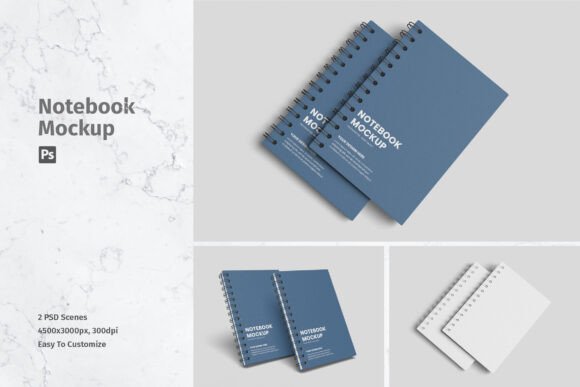
A notebook mockup is essentially a pre-rendered image or template that allows designers to place their own artwork onto a realistic representation of a physical notebook. The primary value proposition lies in its ability to provide a realistic 3D display. When a design is viewed in isolation on a screen, it lacks environmental context. However, when placed on a textured paper surface with appropriate lighting, shadows, and perspective, the design gains depth and credibility.
This item is suitable to showcase your designs professionally because it mimics the way a potential customer would interact with the final printed product. Whether you are designing a corporate journal, a creative sketchbook, or a branded planner, the mockup helps visualize how ink interacts with paper, how the spine bends, and how the cover material reflects light. This level of detail is crucial for convincing clients that a design will translate well from screen to print.
Technical Features and Usability
For a mockup to be effective, it must balance visual fidelity with ease of use. The specific notebook mockup under discussion is available in PSD Photoshop format, which is the industry standard for layered image editing. The inclusion of smart-object features is perhaps the most significant technical advantage. Smart objects allow users to replace the current designs with their own within seconds, without needing to manually adjust perspective, warp tools, or lighting effects.
The technical specifications support high-quality output:
- Resolution: The files are provided at 4500x3000 pixels, ensuring that the images remain sharp even when viewed on high-density displays or printed in large formats.
- DPI: At 300 dpi (dots per inch), the mockup meets the standard requirement for professional printing, guaranteeing that no pixelation occurs during close-up inspection.
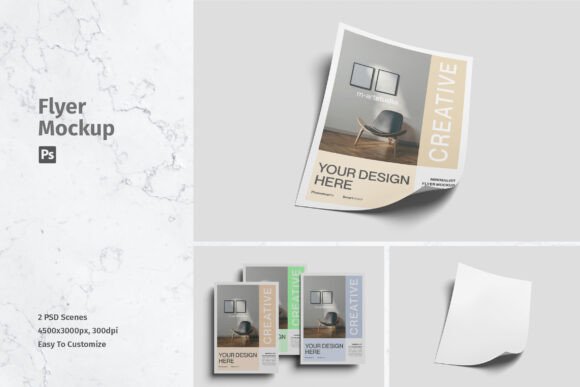
- File Count: The package includes 02 PSD files, offering variety in angle or composition to suit different presentation needs.
- Support: A help file is included to guide users through the smart-object replacement process, reducing the learning curve for those new to Photoshop templates.
The ability to replace designs easily and quickly means that designers can iterate rapidly. You can test multiple color schemes, logos, or typographic layouts in the time it would take to render a single 3D model from scratch. This efficiency is invaluable during the client feedback phase, where quick adjustments are often required.
Benefits of Using Pre-Made Mockups
The decision to use a pre-made notebook mockup rather than creating one from scratch involves several strategic benefits. First, it saves considerable time. Creating a photorealistic 3D render requires specialized software, lighting knowledge, and texturing skills. By leveraging a ready-made template, designers can focus their energy on the core design work rather than the presentation mechanics.
Second, it ensures consistency. When presenting a brand identity system, using a standardized mockup style across various touchpoints—such as business cards, letterheads, and notebooks—creates a cohesive visual narrative. The realistic 3D display provided by these templates ensures that all elements look like they belong to the same physical world.
Third, it enhances perceived value. Clients often struggle to visualize abstract concepts. A high-resolution, realistic image of their logo on a premium notebook cover makes the intangible tangible. It helps them emotionally connect with the design, potentially accelerating approval processes.
Considerations and Limitations
While the benefits are clear, there are tradeoffs and considerations to keep in mind. One important note is that photos used in the preview are not included; they are for illustration purposes only. This means that while the notebook structure and lighting are part of the template, any additional props, backgrounds, or lifestyle elements seen in promotional images may need to be sourced separately if you wish to replicate that exact aesthetic. Designers must ensure they have the rights to any additional imagery they incorporate into the final composition.
Additionally, reliance on smart objects requires a basic proficiency with Adobe Photoshop. While the process is designed to be easy, users who are unfamiliar with layer management or smart object functionality may initially face a slight learning curve. However, the included help file mitigates this issue effectively.
Another consideration is flexibility. Pre-made mockups offer fixed angles and lighting conditions. If a project requires a highly specific camera angle or unique environmental lighting that differs from the provided PSD files, a custom 3D render might be necessary. The two provided files offer some variation, but they may not cover every conceivable scenario.
When to Choose This Solution
This notebook mockup is a strong fit for several specific situations:
- Portfolio Development: Freelancers and agencies looking to populate their portfolios with professional-grade case studies will find this tool indispensable. It elevates simple flat designs into compelling visual stories.
- Client Presentations: When pitching branding packages, including a notebook mockup demonstrates attention to detail and helps clients visualize the brand in physical applications.
- E-commerce Listings: For sellers of digital planners or print-on-demand products, realistic mockups are essential for product listings. They provide customers with a clear expectation of the final product.
- Rapid Prototyping: During the early stages of design, being able to swap out graphics quickly allows for rapid A/B testing of visual concepts.
Alternatives and Decision-Making Insights
Before selecting this tool, consider your specific workflow and needs. If you require complete control over every pixel of lighting and geometry, investing in 3D modeling software like Blender or Cinema 4D might be more appropriate, though it comes with a steeper learning curve and higher time cost. Conversely, if you do not have access to Photoshop, this PSD-based solution will not be compatible, and you might need to seek out online mockup generators that work in the browser, though these often offer lower resolution and less customization.
To determine whether this aligns with your goals, ask yourself: Do I need high-resolution outputs for print or large screens? Is speed of iteration a priority? Do I have access to Photoshop? If the answer to these questions is yes, then a smart-object enabled PSD mockup is likely the most efficient choice.
In conclusion, a Notebook Mockup is more than just a decorative element; it is a functional tool for communication. By providing a realistic 3D display with easy-to-use smart objects, it empowers designers to present their work with professionalism and clarity. Understanding its features, such as the 4500x3000 px size and 300 dpi resolution, helps ensure that you can meet high-quality standards while maintaining an efficient workflow. Whether you are refining a portfolio or closing a client deal, integrating such tools can significantly enhance the impact of your visual communication.