Mastering Professional Presentation: The Power of a Shopping Bag Mockup
In the competitive world of graphic design and branding, the difference between a good idea and a sold concept often lies in presentation. Clients and stakeholders rarely have the imagination to visualize how a flat, two-dimensional logo will look on a physical product. This is where the shopping bag mockup becomes an indispensable tool for modern designers. It bridges the gap between digital creation and tangible reality, allowing creatives to showcase their work with stunning clarity and professionalism.
A high-quality mockup is not merely a background image; it is a sophisticated template designed to elevate your portfolio and client pitches. By utilizing a realistic 3D display, you can demonstrate exactly how your branding will appear in the real world, complete with shadows, textures, and lighting effects that add depth and credibility to your designs.
Understanding the Role of Mockups in Modern Design
To understand the value of a shopping bag mockup, one must first appreciate the challenges of digital design. When you create a logo or pattern in software like Adobe Photoshop or Illustrator, it exists in a vacuum. It is clean, sharp, and perfectly aligned, but it lacks context. A mockup provides that context. It places your design onto a virtual object—in this case, a shopping bag—simulating how ink interacts with paper, how light hits the surface, and how the material folds and creases.
This process is crucial for several reasons:
- Realism: It transforms abstract concepts into believable products.
- Efficiency: It saves time by eliminating the need for expensive photoshoots.
- Versatility: It allows for rapid iteration and testing of different color schemes and layouts.
For businesses, this means faster decision-making. For designers, it means a more compelling portfolio. The ability to present a design professionally can significantly increase the perceived value of your work, making it easier to justify pricing and secure contracts.
Why Choose a PSD Format with Smart Objects?
Not all mockups are created equal. The most efficient and user-friendly mockups are delivered in PSD (Photoshop Document) format and utilize a feature known as Smart Objects. If you are new to professional design tools, this might sound technical, but it is actually quite simple and incredibly powerful.
A Smart Object is a container that holds your design separately from the mockup’s effects. This means you can replace the design easily and quickly without disturbing the lighting, shadows, or perspective of the bag. Here is how it typically works:
- You open the PSD file in Adobe Photoshop.
- You locate the specific layer marked as a Smart Object (often indicated by a small icon in the corner of the layer thumbnail).
- You double-click this layer, which opens a new tab containing your placeholder design.
- You paste your own artwork into this tab and save it.
- The main document automatically updates, wrapping your design around the bag with perfect perspective and realism.
This feature allows you to replace the current designs with your own within seconds. It removes the steep learning curve associated with manual warping and blending, making professional-grade presentations accessible to beginners while remaining a time-saver for experienced professionals.
Key Features of a High-Quality Shopping Bag Mockup
When selecting a mockup for your next project, it is essential to look for specific technical specifications that ensure quality and flexibility. A premium shopping bag mockup should offer more than just a pretty picture; it should provide a robust framework for your creativity. Let us explore the critical features found in top-tier templates.
Resolution and Print Readiness
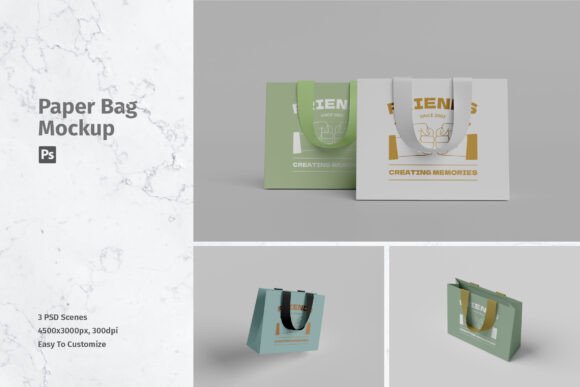
One of the most important aspects of any design asset is its resolution. A low-resolution image may look acceptable on a small screen, but it will appear pixelated and unprofessional when zoomed in or printed. A high-standard mockup should offer a size of at least 4500x3000 pixels at 300 DPI (dots per inch).
This high resolution ensures that your final output is crisp and clear, suitable for both high-definition digital displays and large-format printing. Whether you are creating a social media post or a high-end brochure, having a 300 DPI source file guarantees that your work maintains its integrity across all mediums.
Variety and Flexibility
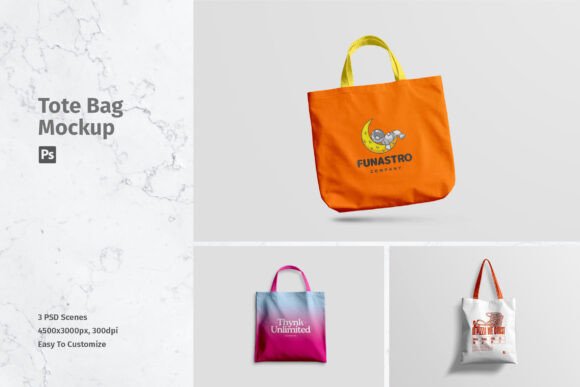
Creativity thrives on options. A single angle might not always suit your design. Therefore, the best mockup packages include multiple variations. For instance, a comprehensive set might include 03 PSD files, each offering a different perspective or lighting condition. This variety allows you to choose the angle that best highlights the unique elements of your branding. You might prefer a front-facing view for a bold logo, or a side angle to showcase a pattern running along the gusset of the bag.
Ease of Use and Documentation
Even the most powerful tools are useless if they are too difficult to operate. A user-friendly mockup comes with a help file or documentation that guides you through the process. This is particularly helpful for those who are just starting their journey with Photoshop. Clear instructions ensure that you can focus on your design rather than struggling with the software.
Furthermore, the organization of layers within the PSD file matters. Well-labeled layers make navigation intuitive, allowing you to adjust background colors, shadow intensity, or other environmental factors if the template permits such customization.
Practical Applications in Business and Creativity
The utility of a shopping bag mockup extends far beyond individual freelance projects. It plays a significant role in various sectors of modern business and education.
Retail Branding: For retail businesses, the shopping bag is a mobile billboard. It travels through streets, malls, and offices, exposing the brand to potential customers. Using a mockup, marketing teams can test different bag designs to see which one aligns best with their seasonal campaigns or brand identity before committing to mass production.
E-commerce and Online Stores: In the digital marketplace, customers cannot touch or feel the product. High-quality visuals are the only sensory input they have. By using realistic mockups on product pages, online stores can reduce uncertainty and increase conversion rates. Customers are more likely to purchase when they can visualize the quality and aesthetic of the packaging.
Education and Portfolios: For students and junior designers, building a strong portfolio is essential for landing jobs. Including mockups in your portfolio demonstrates that you understand the practical application of your designs. It shows potential employers that you think beyond the screen and consider the end-user experience.
Common Misunderstandings About Mockups
Despite their popularity, there are some common misconceptions about using mockups. One frequent assumption is that using a mockup is "cheating" or lacks originality. In reality, mockups are industry-standard tools used by top agencies worldwide. They are not a replacement for design skill but a method of presenting that skill effectively.
Another misunderstanding involves the content of the preview images. It is crucial to note that photos used in the preview are not included; they are just for illustration purposes only. This means you must supply your own artwork. The mockup provides the stage, but you provide the performance. This distinction is vital for copyright and usage rights, ensuring that you maintain full ownership of your creative work while leveraging the structural benefits of the template.
Conclusion: Elevating Your Design Workflow
In conclusion, integrating a shopping bag mockup into your design workflow is a strategic move that enhances both efficiency and presentation quality. By leveraging the power of Smart Objects in PSD format, you can achieve realistic, high-resolution results with minimal effort. The ability to swap designs in seconds allows for greater experimentation and faster client approvals.
Whether you are a seasoned art director or a beginner learning the ropes, understanding how to use these tools effectively will set you apart. Remember to look for high-resolution files, organized layers, and comprehensive help documentation. With the right resources, you can transform your digital creations into compelling visual stories that resonate with clients and customers alike. Embrace the technology, refine your presentation, and watch your design career grow.