Evaluating the Flyer Mockup for Professional Design Presentation
In the competitive landscape of graphic design and marketing, the gap between a flat digital file and a tangible, physical product is often where client approval is won or lost. A Flyer Mockup serves as the critical bridge in this process, transforming abstract layouts into realistic, three-dimensional representations that stakeholders can visualize in the real world. For professionals ranging from freelance designers to agency art directors, the ability to present work convincingly is just as important as the design itself. This evaluation explores the practical utility, technical specifications, and workflow integration of a high-quality flyer mockup resource, specifically focusing on its capacity to enhance professional presentation through realistic 3D displays.
The Strategic Value of Realistic Visualization
When presenting a new campaign or brand identity, clients often struggle to interpret two-dimensional JPEGs or PDFs. They may question how colors will look on paper, how shadows interact with folds, or how the overall composition feels in a hand-held format. A well-crafted Flyer Mockup addresses these concerns by providing context. By placing your design onto a photorealistic template, you allow the viewer to focus on the aesthetics and messaging rather than trying to mentally project the file onto a physical object.
The primary strength of this specific asset lies in its realism. Unlike basic overlays that simply paste an image onto a flat plane, advanced mockups utilize lighting, perspective, and texture mapping to simulate depth. This level of fidelity is essential for maintaining credibility. If a mockup looks artificial, it can inadvertently cast doubt on the quality of the design work itself. Therefore, the choice of a mockup is not merely a cosmetic decision but a strategic one that influences perceived value.
Technical Specifications and Workflow Efficiency
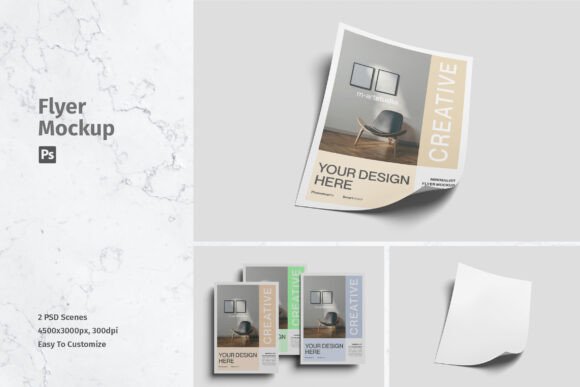
For any design tool to be viable in a professional environment, it must balance quality with efficiency. This Flyer Mockup is delivered in PSD (Photoshop) format, leveraging smart-object technology to streamline the customization process. The inclusion of smart objects is arguably the most significant feature for daily users. It allows designers to replace the placeholder artwork with their own designs within seconds, without needing to manually adjust perspective grids or warp tools.
The technical resolution of the file is set at 4500x3000 pixels at 300 DPI. This specification is crucial for several reasons. First, it ensures that the final output remains crisp and detailed, even when viewed on high-resolution retina displays or printed in large-format portfolios. Second, the 300 DPI standard aligns with professional printing requirements, meaning the mockup can be used for both digital presentations and physical proofing materials without loss of quality. The availability of two distinct PSD files provides additional flexibility, allowing designers to choose the angle or lighting scenario that best complements their specific design layout.
Usability and Accessibility for Diverse Users
One of the notable aspects of this resource is its accessibility to a broad range of users. While it is built for Adobe Photoshop, the reliance on smart objects means that advanced knowledge of complex masking or 3D rendering is not required. This makes the Flyer Mockup suitable not only for seasoned graphic designers but also for marketers, small business owners, and entrepreneurs who need to create professional-looking promotional materials quickly.
- Time-Saving: The drag-and-drop nature of smart objects reduces editing time from minutes to seconds.
- Non-Destructive Editing: Changes can be made repeatedly without degrading the original template file.
- Help File Inclusion: The presence of a help file ensures that users unfamiliar with smart objects can get up to speed quickly, reducing the learning curve.
However, it is important to note a common limitation in such resources: the photos used in the preview are for illustration purposes only and are not included in the download. Users must supply their own design assets. This is standard practice in the industry but requires users to have their artwork ready before beginning the mockup process.
Real-World Applications and Audience Fit
The versatility of a high-resolution flyer mockup extends across various industries and use cases. For freelancers, using a realistic mockup in portfolio pieces can significantly elevate the perceived professionalism of their work. It demonstrates an attention to detail and an understanding of how design functions in the physical world. For marketing agencies, these mockups are invaluable during client pitch meetings. Presenting a design on a realistic flyer helps clients visualize the end product, facilitating faster approval cycles and reducing the number of revision rounds caused by miscommunication.
Small business owners and entrepreneurs who handle their own marketing can also benefit immensely. Whether promoting a local event, a restaurant special, or a retail sale, having a polished visual asset for social media or email campaigns can increase engagement. The 3D display adds a tactile quality that static images lack, making the promotion feel more immediate and tangible to the audience.
Educators and publishers may find this tool useful for creating teaching materials or showcasing publication layouts. By simulating the look of printed flyers, they can provide students or clients with a clearer understanding of print design principles, such as bleed, margin, and fold lines, even if the final output is digital.
Quality Consistency and Long-Term Value
When evaluating digital assets, consistency is key. A reliable Flyer Mockup should produce consistent results regardless of the design placed within it. The lighting and shadow effects should adapt naturally to different color palettes and contrast levels. This particular asset, with its high-resolution base and careful attention to light interaction, offers a stable foundation for diverse design styles. Whether the flyer features bold, vibrant graphics or minimalist, text-heavy layouts, the mockup maintains its integrity.
From a long-term value perspective, investing in a high-quality mockup template pays dividends over time. Unlike subscription-based services that require ongoing payments, a one-time purchase of a robust PSD file provides a reusable asset that can be employed across countless projects. The durability of the file format ensures compatibility with future versions of Photoshop, safeguarding the investment against software updates.
Practical Recommendations for Best Results
To maximize the effectiveness of this Flyer Mockup, consider the following best practices. First, ensure your source design file is properly prepared. Check that the dimensions match the smart object layer to avoid unintended stretching or pixelation. Second, pay attention to the lighting direction in the mockup. If your design has strong shadows or highlights, try to align them with the light source in the mockup scene for a more cohesive look.
Additionally, while the smart object feature handles the placement, take a moment to review the final composite. Minor adjustments to brightness or contrast within the smart object can help the design blend more seamlessly with the paper texture and ambient light of the scene. This extra step can distinguish a good presentation from a great one.
In conclusion, the Flyer Mockup represents a practical, efficient, and high-quality solution for anyone needing to present flyer designs professionally. Its combination of high resolution, ease of use via smart objects, and realistic 3D rendering makes it a valuable addition to the toolkit of designers, marketers, and business owners. By bridging the gap between digital creation and physical reality, it enhances communication, accelerates approval processes, and elevates the overall perception of creative work. For those seeking to refine their presentation standards without compromising on workflow speed, this asset offers a compelling balance of form and function.